



Download A4 Flash Menu Builder – Easy Flash Menu Creation Tool
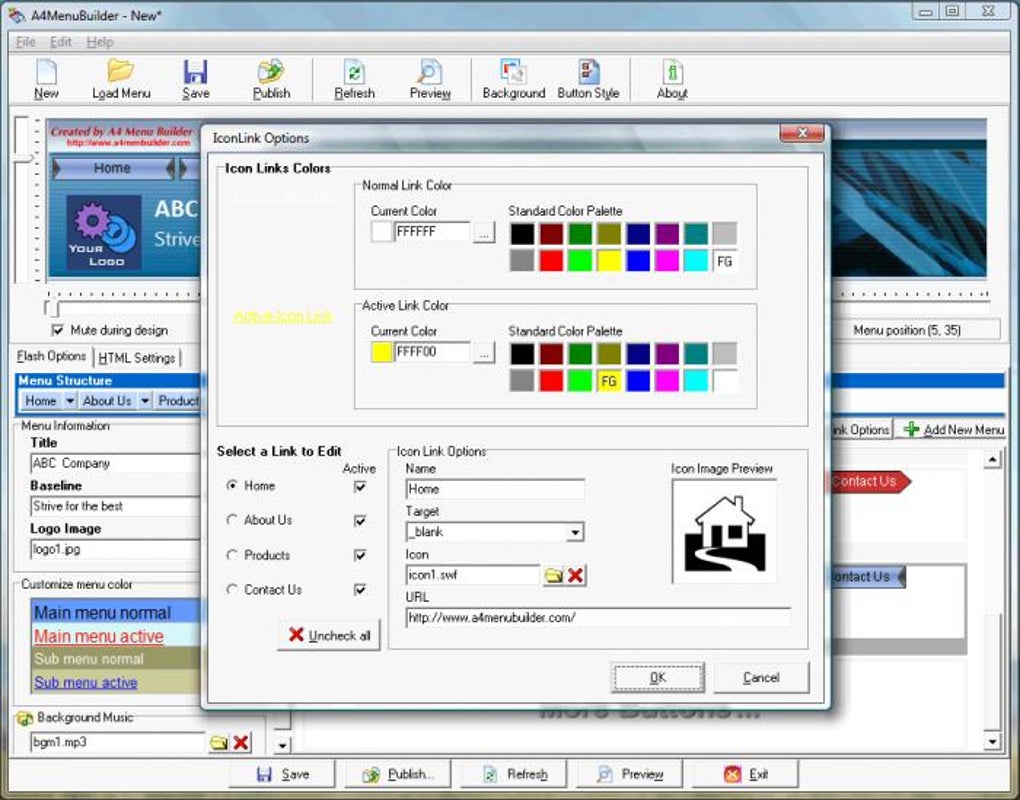
A4 Flash Menu Builder is a lightweight desktop utility that lets anyone craft flash‑based navigation menus without writing a single line of ActionScript. Designed for beginners, the program offers an intuitive drag‑and‑drop interface, pre‑built animation presets, and built‑in HTML export so the menus can be embedded directly into web pages. Whether you need a simple drop‑down navigation bar, a banner with animated icons, or a full‑screen menu with background music, A4 Flash Menu Builder delivers a quick, secure, and free‑to‑try solution that runs on standard Windows PCs. While it is not a replacement for professional Flash development tools, it fills a niche for non‑technical users who want a functional menu in minutes rather than hours of coding.
Key Features and What Sets It Apart
- Zero‑code menu creation – no ActionScript required.
- Pre‑designed templates for drop‑down, sub‑menus, and banner layouts.
- Customizable colors, fonts, and animation speeds.
- Support for audio tracks, sound effects, and background music.
- Instant HTML generation for seamless website integration.
- Simple icon and image import with automatic scaling.
- Live preview window to test animations before export.
- Portable installation – works from a USB stick without admin rights.
- Free trial version with full feature access for 30 days.
- Lightweight footprint (under 20 MB) and quick startup.
Installation, Usage Instructions, and Compatibility
Step‑by‑Step Installation
- Visit the official A4 Flash Menu Builder download page and click the “Download for Windows” button.
- Save the installer (A4FlashMenuBuilderSetup.exe) to a convenient folder.
- Run the executable; the wizard will guide you through license acceptance, destination folder selection, and shortcut creation.
- Complete the installation by clicking “Finish.” The program will launch automatically.
Getting Started with Your First Menu
Upon launch, you are greeted by a clean workspace split into a Canvas area and a Properties panel. To begin:
- Choose a template from the Template Library (e.g., “Horizontal Drop‑Down”).
- Drag menu items from the Item Palette onto the canvas. Double‑click an item to edit its label.
- Use the Style Toolbar to adjust fonts, colors, and hover effects. All changes are reflected instantly in the live preview.
- To add a background track, click the Audio tab, import an MP3 file, and set playback options (loop, volume, start time).
- When satisfied, press the Export button. Choose “Export as Flash (SWF) + HTML” to generate both files in a single folder.
- Upload the generated files to your web server and insert the provided HTML snippet into your site’s navigation area.
System Requirements and Operating System Support
A4 Flash Menu Builder is built for Windows 7, 8, 10, and 11 (both 32‑bit and 64‑bit). The software relies on the Adobe Flash Player runtime for preview, so a compatible version of Flash Player must be installed on the development machine. Because the final output is an SWF file, end‑users will need a browser that still supports Flash or a fallback HTML5 wrapper provided by the export wizard. The program does not have native macOS, Linux, Android, or iOS versions, but you can run it on macOS using virtualization tools such as Parallels or VirtualBox with a Windows guest OS.
Pros, Cons, and Frequently Asked Questions
Pros and Cons
- Pros
- Extremely low learning curve – ideal for novices.
- Fast workflow; a basic menu can be created in under five minutes.
- Built‑in HTML export removes the need for manual coding.
- Free trial with no hidden fees; the full version is a one‑time purchase.
- Lightweight installer and portable mode for on‑the‑go work.
- Cons
- Limited to simple menu structures; complex animations require a professional Flash editor.
- Outputs SWF files, which are increasingly deprecated in modern browsers.
- No native macOS or Linux version; Windows‑only.
- Lacks integration with modern web frameworks (React, Vue, etc.).
- Audio support is basic; no advanced mixing or multi‑track options.
Frequently Asked Questions
Do I need Adobe Flash Player installed to use A4 Flash Menu Builder?
Yes, the preview window uses the local Flash Player runtime. The final SWF file will also require a compatible player on the visitor’s browser, or you can wrap it in HTML5 using the export options.
Can I export my menu as HTML5 instead of Flash?
A4 Flash Menu Builder focuses on SWF output. However, the export wizard includes an optional HTML wrapper that can embed a fallback image or use a JavaScript shim for limited HTML5 support, but it does not produce a true HTML5 animation.
Is the trial version fully functional?
The 30‑day trial unlocks all features, including audio, custom colors, and export options. After the trial expires, you must purchase a license to continue saving projects.
What file format does the program export?
The primary output is an SWF file (Shockwave Flash) accompanied by a small HTML snippet that references the SWF. You can also export a PNG preview for static use.
Can I use the generated menu on a WordPress site?
Yes. Upload the SWF and HTML files to your WordPress media library, then insert the HTML snippet into a custom HTML widget or directly into a page/post using the “Text” editor.
Conclusion – Should You Download A4 Flash Menu Builder?
For absolute beginners who need a quick, no‑code way to add a Flash‑style navigation menu, A4 Flash Menu Builder delivers on its promises. The program’s drag‑and‑drop interface, built‑in templates, and one‑click HTML export make it possible to produce a functional menu in minutes. While the reliance on SWF limits long‑term compatibility, the tool still serves as a valuable bridge for small‑scale projects, educational settings, or legacy websites that still run Flash content.
If you are comfortable with a one‑time purchase and can manage the browser support considerations, the free trial is a risk‑free way to test whether the software meets your needs. Ready to give it a try? Download A4 Flash Menu Builder now and start building menus without ever writing a line of code.
Overall Rating: 4 out of 5 stars
Pros: Easy to use, fast export, free trial, lightweight.
Cons: SWF‑only output, Windows‑only, limited advanced features.







